Cat Multilayer and Cat Layered SVG: A Practical Guide to Precision Paper Cutting
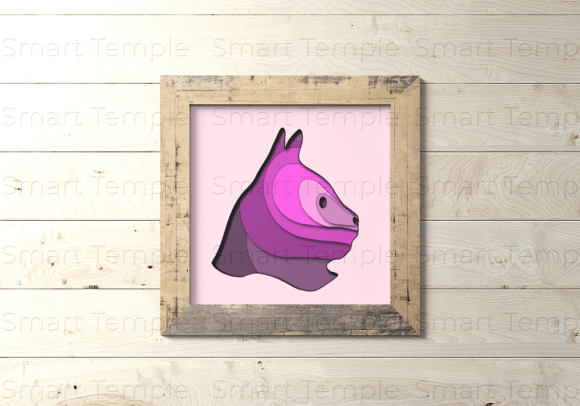
The charm of a Cat Multilayer design lies in its depth. Unlike flat illustrations, these layered compositions create a tangible sense of dimension, turning simple materials into intricate shadow boxes. Whether you are crafting a whimsical nursery decoration or a sophisticated home accent, the Cat Layered Svg format has become a staple for modern crafters. However, the gap between downloading a file and achieving a gallery-worthy result is often wider than beginners anticipate. Success in this niche requires more than just a cutting machine; it demands an understanding of material behavior, file integrity, and assembly logic.
This digital product typically arrives as a comprehensive ZIP archive containing SVG, AI, PNG, and DXF files. This versatility ensures compatibility with a wide range of equipment, from consumer-grade devices like Cricut and Silhouette Cameo to industrial CNC routers and laser cutters. While the convenience of instant digital delivery is undeniable, treating these files as plug-and-play solutions without proper preparation is a common pitfall. To help you avoid wasted materials and frustration, let’s explore the critical aspects of working with these layered vector models.
Understanding the File Ecosystem
One of the first mistakes creators make is assuming all file formats are interchangeable for every task. The included SVG (Scalable Vector Graphics) and AI (Adobe Illustrator) files are essential for cutting machines because they retain path data. This allows your software to recognize where the blade or laser should move. In contrast, the PNG file is a raster image, useful primarily for previewing the final look or for sublimation printing, but useless for direct cutting unless you perform complex trace operations that often degrade quality.
If you are using a laser cutter or CNC machine, the DXF file is often preferred due to its robustness in CAD environments. Beginners often overlook this distinction, attempting to import PNGs into laser software, which results in poor edge definition and inefficient cutting paths. Always verify that your software supports the specific vector format you intend to use. If you require a different file type not included in the standard package, reputable sellers usually encourage you to contact them directly. This proactive communication can save hours of troubleshooting later.
Material Selection: Beyond Paper and Cardboard
The description of this vector model highlights compatibility with cardboard, paper, plastic, metal, plywood, wood, and MDF. While this list is extensive, it does not mean every material behaves the same way. A frequent error is applying the same cutting settings across different substrates. For instance, cutting plywood requires significantly more power and slower speeds than cutting cardstock. Using paper settings on wood will result in incomplete cuts, while using wood settings on paper will incinerate your design.
Furthermore, the thickness of the material directly impacts the visual success of a Cat Multilayer project. If you choose a material that is too thin, such as standard printer paper, the layers may collapse into each other, losing the intended shadow effect. Conversely, overly thick materials like heavy-duty MDF can make the assembly bulky and difficult to adhere properly. For beginners, starting with high-quality cardstock or 3mm plywood is advisable. These materials offer a balance of rigidity and ease of cutting, allowing the layered design to stand out without requiring advanced structural engineering.
The Hidden Challenge of Assembly and Tolerance
Perhaps the most overlooked aspect of layered SVG projects is tolerance. When you stack multiple layers of material, even a fraction of a millimeter of misalignment can throw off the entire composition. Many users blame the digital file for "bad design" when the issue is actually mechanical. Laser kerf (the width of the material burned away by the laser) and blade drag (the slight pull of a knife blade) can alter the dimensions of your pieces.
To mitigate this, always perform a test cut on a scrap piece of your chosen material. Check if the layers fit together as expected. If you find that the pieces are too tight, you may need to adjust your scale slightly or modify the cut settings. For Cat Layered Svg designs, where facial features or whiskers might be delicate, precision is paramount. Rushing the assembly process by using excessive glue can also warp thin materials like paper, ruining the flat, clean aesthetic. Use minimal adhesive, such as double-sided tape or precision glue dots, to maintain the integrity of each layer.
Choosing the Right Machine for the Job
While the files are compatible with Cricut, Silhouette, Cameo, and laser machines, not every machine is suited for every material in the list. Consumer vinyl cutters excel at paper, cardstock, and thin plastics but struggle with wood or metal. Attempting to force a Cricut to cut through 3mm plywood can damage the machine’s motor and blades. On the other hand, laser cutters handle wood, acrylic, and MDF with ease but may char certain papers if the power is not finely tuned.
Before purchasing or downloading, assess your equipment’s capabilities. If you only own a blade-based cutter, stick to paper, cardboard, and thin plastic variants of the design. If you have access to a laser cutter or CNC router, you can explore the more durable options like wood and metal. Understanding these limitations prevents equipment damage and ensures safety. For those looking to scale their hobby into a small business, investing in the right tool for your primary material choice is more cost-effective than trying to make one machine do everything poorly.
Quality Control Before You Cut
Finally, never skip the pre-cut inspection. Open your SVG or AI file in your design software and zoom in. Look for disconnected nodes or overlapping paths that could cause the machine to cut the same line twice, weakening the material. Ensure that all layers are properly grouped and colored according to your machine’s layer recognition system. This step is crucial for Cat Multilayer designs, where specific colors often correspond to specific depths in the shadow box.
By taking the time to understand the files, select appropriate materials, respect machine limitations, and prepare your workspace, you transform a simple digital download into a professional-quality craft. The Cat Layered Svg is a powerful tool for creativity, but like any tool, its effectiveness depends on the skill and care of the user. Approach each project with patience and attention to detail, and you will consistently produce results that captivate and inspire.