Crafting the Ultimate Gamer Wall Clock with Laser Cut Files
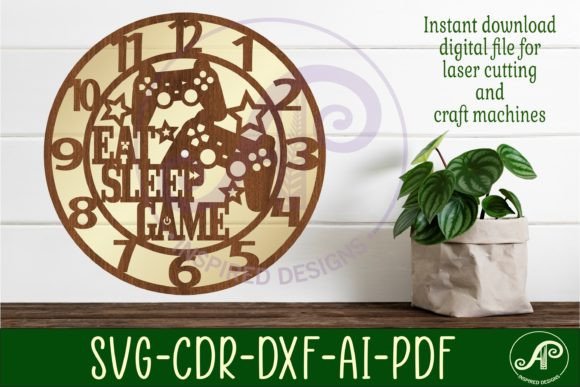
The intersection of gaming culture and home decor has never been more vibrant. For enthusiasts who want to showcase their passion beyond the screen, custom wall art offers a perfect solution. Among the most popular DIY projects in this niche is the Gamer Wall Clock. These timepieces are not just functional; they serve as bold statement pieces that reflect personality, style, and a love for digital worlds. Creating one from scratch might seem daunting, but with the right digital assets, specifically Gamer Wall Clock Laser Cut Files, the process becomes accessible to makers of all skill levels.
This guide explores how these digital templates transform raw materials into stunning decor, detailing the technical specifications, software compatibility, and practical considerations for bringing your vision to life.
Why Choose Digital Templates for Laser Cutting?
In the modern maker space, efficiency and precision are paramount. Designing a complex geometric or thematic clock face from scratch requires advanced vector graphic skills and significant time investment. By utilizing pre-designed SVG and laser cut files, you bypass the initial design hurdle. These templates are crafted by experienced designers who understand the nuances of laser cutting, such as kerf width, bridge connections, and structural integrity.
When you download a package containing Gamer Wall Clock Laser Cut Files, you are acquiring a tested blueprint. This ensures that the intricate details typical of gamer aesthetics—such as pixelated fonts, controller silhouettes, or sci-fi motifs—are optimized for cutting. The result is a professional-looking finish that rivals store-bought items, but with the unique satisfaction of having built it yourself.
Understanding the File Formats
Versatility is key when working with various cutting machines and design software. A high-quality digital download should provide multiple file types to ensure compatibility across different platforms. The standard package for these clock templates typically includes a comprehensive zip folder containing the following formats:
- SVG (Scalable Vector Graphics): This is the most universal format for web-based design tools and many laser cutting software suites. It is crucial to note that these files often come in two variations: filled and outline. The outline version is essential for machines that require closed paths for cutting, while the filled version may be used for engraving or specific software interpretations.
- DXF (Drawing Exchange Format): Widely supported by CAD programs and older laser cutting systems, DXF files are a reliable backup if SVGs cause issues in your workflow.
- AI (Adobe Illustrator): For users who prefer Adobe’s ecosystem, AI files allow for easy editing and customization within Illustrator before sending the design to the cutter.
- CDR (CorelDRAW): Specifically designed for CorelDRAW users, this format ensures that nodes and curves remain editable without conversion errors. Many professional laser operators prefer CorelDRAW for its direct hardware integration.
- PDF: While not always used directly for cutting, PDFs serve as excellent reference files for viewing the design layout and scale before opening heavy vector software.
Having access to this diverse range of formats means you are not locked into a single software ecosystem. Whether you are using LightBurn, RDWorks, or proprietary machine software, there is a file type ready for import.
Technical Specifications and Sizing
One of the most critical aspects of successful laser cutting is scaling. The Gamer Wall Clock Laser Cut Files are typically designed with a recommended size range of 25 to 50 centimeters. This flexibility allows you to create a subtle accent piece for a desk setup or a large focal point for a living room gaming station.
The default saved size for these templates is often 29 cm (approximately 11.4 inches) wide. This dimension is ideal for standard wall spaces and provides enough surface area for the design details to be visible without overwhelming the room. However, because these are vector files, you can scale them up or down infinitely without losing resolution. Just remember to adjust your laser settings accordingly; thicker materials or larger scales may require slower speeds or multiple passes.
The Importance of the Center Hole
A functional clock requires precise mechanics. The digital templates include a pre-defined center hole with a diameter of 8mm. This specific measurement is standardized to fit the vast majority of quartz clock movements available on the market. Before cutting, it is advisable to measure the shaft of your specific clock mechanism to ensure a snug fit. An 8mm hole usually accommodates the threaded shaft and securing nut perfectly, allowing the hands to rotate freely without wobbling.
Software Compatibility and Workflow
These designs are created with professional-grade tools to ensure quality. The original templates are often designed in CorelDRAW, a powerhouse in the laser cutting industry. However, they are rigorously tested in LightBurn, another popular software choice for hobbyists and professionals alike. This dual-testing approach guarantees that the paths are clean, nodes are properly connected, and there are no stray lines that could confuse the laser head.
When importing these SVG or DXF files into your software, always check the layer assignments. Typically, cut lines should be assigned to a specific color (often red) with a thin stroke weight, while engrave areas might be assigned to another color (like black) with a fill. Proper layer management ensures that your machine cuts the outer perimeter and inner details correctly while engraving any textured elements if included in the design.
Material Selection for Gamer Aesthetics
The choice of material significantly impacts the final look of your gamer wall clock. Since the design is laser-cut, you have several options:
- Acrylic: For a sleek, modern, and neon-friendly look, acrylic is unbeatable. It comes in various colors and finishes, including mirror and translucent options. When backlit with LED strips, an acrylic gamer clock can glow, enhancing the cyberpunk or futuristic vibe.
- Plywood or MDF: Wood offers a warm, rustic contrast to the high-tech theme. Birch plywood cuts cleanly and sands smoothly, making it easy to paint or stain. You can create a multi-layered effect by stacking different colored woods or painting layers to add depth to the design.
- Metal: If you have access to a fiber laser or CNC router, metal sheets can produce an industrial, durable clock. This is ideal for a more rugged, masculine aesthetic.
Regardless of the material, ensure it is flat and free of warping to prevent focus issues during the cutting process.
Assembly and Installation Tips
Once the cutting is complete, the assembly process is straightforward. Start by removing any charred edges or smoke residue from the cut pieces. A light sanding or wiping with a damp cloth can clean up acrylic, while wood may require a bit more attention to remove soot.
Insert the clock movement through the 8mm center hole from the back. Secure it with the provided washer and nut. Attach the hour, minute, and second hands, ensuring they do not touch each other or the clock face. Finally, mount the clock on the wall using appropriate anchors for your wall type. Given the lightweight nature of most laser-cut materials, standard picture hanging hooks often suffice, but heavier materials like thick acrylic or metal may require stronger support.
Final Thoughts on Customization
Owning the digital files gives you the freedom to iterate. You can experiment with different color combinations, layer multiple materials for a 3D effect, or even modify the vector paths slightly to add personal touches. The Gamer Wall Clock Laser Cut Files are not just a product; they are a starting point for creativity. By leveraging these professional templates, you save time on design while ensuring a high-quality, precise cut that elevates your gaming space. Whether you are a seasoned maker or a beginner looking for a rewarding weekend project, these digital downloads provide the perfect balance of convenience and creative control.